


Aura Studio 3
Details https://vn.harmankardon.com/AURA+STUDIO+3.html?dwvar_AURA%20STUDIO%203_color=Black-APAC-CurrentLoa Bluetooth
Loa Bluetooth


Thiết kế thanh lịch, trang nhã
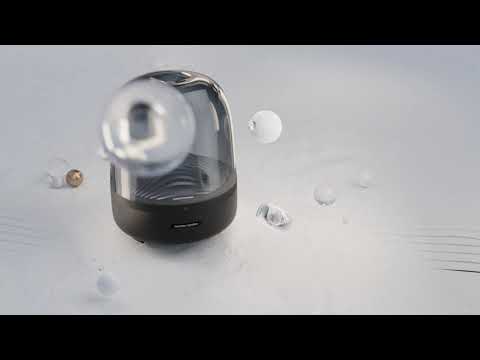
Một kiệt tác nghệ thuật của âm thanh. Với kiểu dáng vòm độc đáo, chất liệu cao cấp cùng hiệu ứng ánh sáng môi trường, Harman Kardon Aura Studio 3 như một tuyên ngôn kiến trúc hiện đại trong ngôi nhà của bạn.

Kiệt tác âm thanh 360 độ
Phong cách từ vật chất. Harman Kardon Aura Studio 3 kiến tạo chất âm đa hướng 360 độ. Tận hưởng âm thanh sống động hơn nhờ loa siêu trầm mạnh mẽ cho trải nghiệm nghe thực sự lắng đọng.
Ánh sáng thích nghi
Thổi hồn vào dòng chảy âm nhạc trong căn phòng cùng hiệu ứng ánh sáng môi trường đẹp mắt, tạo nên một trải nghiệm sống động tới cả thính giác lẫn thị giác.

Truyền phát không dây qua Bluetooth
Phát nhạc không dây qua Bluetooth để tận hưởng âm thanh lan tỏa đầy khắp căn phòng.
Biểu tượng ở mọi nơi
Đặt Harman Kardon Aura Studio 3 tại bất kỳ đâu trong căn nhà của bạn. Kiểu dáng tinh tế cùng phong cách tối giản sẽ khiến bạn thấy vừa mắt ngay tức khắc, kiến tạo một biểu tượng tuyệt đẹp hài hòa cùng không gian kiến trúc.
Tô điểm cho ngôi nhà của bạn với thiết kế mang tính biểu tượng vượt thời gian của Harman Kardon Aura Studio 3, cho tuyệt tác âm thanh 360 độ. Một sản phẩm loa không dây không chỉ là một kiệt tác âm thanh mà còn nghệ thuật trong thiết kế. Hiệu ứng ánh sáng chuyển động lượn sóng đưa trải nghiệm âm nhạc lên tầm cao mới, đậm sắc hơn. Kiểu dáng tinh tế cùng phong cách tối giản trong chỉ một dấu chân nhỏ bé, kiệt tác này hài hòa cùng không gian kiến trúc tại bất kì đâu trong ngôi nhà của bạn.
thông tin chi tiết
Spec Sheet (Anh)
Tiếng Việt 1 MBSpec Sheet ()
Tiếng Việt 2 MB- 1x Harman Kardon Aura Studio 3
- 1x Power cable
- 1x Quick start guide
- 1x Safety sheet
- 1x Warranty card

Hướng dẫn sử dụng mới nhất, Hướng dẫn nhanh cùng các tài liệu khác.
Aura Studio Series
\nNote: This action will erase all settings and Bluetooth data from the device. You will be required to pair and connect to your devices again after this action is done.
\n\n
Aura Studio, Aura Studio 2
\n- Turn the speaker ON
- Press and hold the Volume (+) & Phone button for more than 5 seconds
- All LED indicators will flash and the speaker will power off and be factory reset
\n
Aura Studio 3
\n- Turn the speaker ON
- Press and hold the Light Effect button for more than 10 seconds
- The speaker will power off and be factory reset
\n
Aura Studio 4
\n- Turn the speaker ON
- Press and hold the Volume (+) & Bluetooth button for more than 5 seconds
- The speaker will power off and be factory reset
\n
Aura Studio 5, Aura Studio 5 Wi-Fi
\n- Turn the speaker ON
- Press and hold the Light Mode, Vol +, & Vol - button for more than 7 seconds
- The speaker will power off and be factory reset
Or alternatively;
\n\n
- Open your Harman Kardon One App.
- Navigate to the support tile.
- Select RESTORE FACTORY SETTINGS.
Aura Studio Series
\nNote: This action will erase all settings and Bluetooth data from the device. You will be required to pair and connect to your devices again after this action is done.
\n\n
Aura Studio, Aura Studio 2
\n- Turn the speaker ON
- Press and hold the Volume (+) & Phone button for more than 5 seconds
- All LED indicators will flash and the speaker will power off and be factory reset
\n
Aura Studio 3
\n- Turn the speaker ON
- Press and hold the Light Effect button for more than 10 seconds
- The speaker will power off and be factory reset
\n
Aura Studio 4
\n- Turn the speaker ON
- Press and hold the Volume (+) & Bluetooth button for more than 5 seconds
- The speaker will power off and be factory reset
\n
Aura Studio 5, Aura Studio 5 Wi-Fi
\n- Turn the speaker ON
- Press and hold the Light Mode, Vol +, & Vol - button for more than 7 seconds
- The speaker will power off and be factory reset
Or alternatively;
\n\n
- Open your Harman Kardon One App.
- Navigate to the support tile.
- Select RESTORE FACTORY SETTINGS.


