


Harman Kardon Aura Studio 4
Details https://vn.harmankardon.com/AURASTUDIO4.html?dwvar_AURASTUDIO4_color=Light%20grey-APAC-CurrentLoa Bluetooth với thiết kế vòm trong suốt đặc trung cùng ánh sáng độc đáo.
Loa Bluetooth với thiết kế vòm trong suốt đặc trung cùng ánh sáng độc đáo.


Hiệu suất âm thanh vượt trội
Nghe nhạc theo cách nó được nghe. Âm nhạc của bạn được tái tạo với độ chính xác tuyệt đối nhờ các kênh riêng biệt của loa và bộ khuếch đại chuyên dụng, tái tạo mọi chi tiết âm thanh với độ rõ nét ngoạn mục. Cảm nhận từng nhịp điệu từ loa siêu trầm 5,2" phát ra âm trầm sâu lắng, phong phú. Và âm trường rộng của dãy 6 loa là trải nghiệm tuyệt vời để trải nghiệm trực tiếp các bài hát yêu thích của bạn.

Ánh sáng hiệu ứng kim cương nhảy theo điệu nhạc
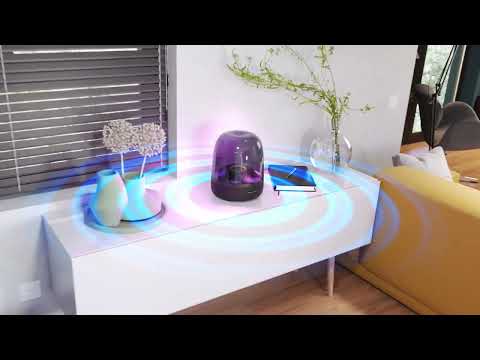
Mái vòm trong suốt đặc trưng của Aura Studio 4 khuếch đại và tỏa ánh sáng xung quanh trang nhã theo mọi hướng. Lấy cảm hứng từ vẻ đẹp của thế giới tự nhiên, các hoa văn và màu sắc chuyển đổi của hệ thống chiếu sáng hiệu ứng kim cương mang lại cảm giác kỳ diệu như vậy cho mọi không gian. Chọn trong số 5 chủ đề hoạt hình riêng biệt để phù hợp với tâm trạng âm nhạc của bạn—và mãn nhãn mọi giác quan.

Truyền phát nhạc qua Bluetooth
Nhạc là để sẻ chia - đó là lý do tại sao Aura Studio 4 ghép nối với bất kỳ thiết bị di động nào để truyền phát không dây liền mạch.

Chế tác một phần từ vật liệu tái chế
Aura Studio 4 được sản xuất bằng 100% vải tái chế, 100% nhôm tái chế và 85% nhựa tái chế, đồng thời được đóng gói bằng giấy có chứng nhận FSC và được in bằng mực làm từ đậu nành.
Truyền cảm hứng cho mọi giác quan của bạn với ánh sáng mê hoặc, đồng điệu theo nhịp âm thanh cực đỉnh của Harman Kardon. Thiết kế mái vòm trong suốt mang tính biểu tượng của Aura Studio 4 tỏa ánh sáng kim cương quyến rũ từ mọi góc nhìn. Chọn 1 trong 5 hiệu ứng ánh sáng theo mạch cảm xúc âm nhạc. Bầu không khí trực quan tươi tốt cũng hấp dẫn như âm trầm mạnh mẽ của loa và âm thanh rõ ràng, rộng rãi. Tạo ra những trải nghiệm đáng nhớ bằng cách ghép nối loa với nhiều thiết bị di động để mọi người có thể chia sẻ rung cảm của riêng mình.
thông tin chi tiết
thông số kỹ thuật
Kích thước
Điều khiển và Thông số kết nối
Spec Sheet (Anh)
Tiếng Việt 920 KB- 1x Harman Kardon Aura Studio 4
- 1x Dây nguồn
- 1x Hướng dẫn nhanh
- 1x Bảng an toàn
- 1x Thẻ bảo hành

Hướng dẫn sử dụng mới nhất, Hướng dẫn nhanh cùng các tài liệu khác.
Aura Studio Series
\nNote: This action will erase all settings and Bluetooth data from the device. You will be required to pair and connect to your devices again after this action is done.
\n\n
Aura Studio, Aura Studio 2
\n- Turn the speaker ON
- Press and hold the Volume (+) & Phone button for more than 5 seconds
- All LED indicators will flash and the speaker will power off and be factory reset
\n
Aura Studio 3
\n- Turn the speaker ON
- Press and hold the Light Effect button for more than 10 seconds
- The speaker will power off and be factory reset
\n
Aura Studio 4
\n- Turn the speaker ON
- Press and hold the Volume (+) & Bluetooth button for more than 5 seconds
- The speaker will power off and be factory reset
\n
Aura Studio 5, Aura Studio 5 Wi-Fi
\n- Turn the speaker ON
- Press and hold the Light Mode, Vol +, & Vol - button for more than 7 seconds
- The speaker will power off and be factory reset
Or alternatively;
\n\n
- Open your Harman Kardon One App.
- Navigate to the support tile.
- Select RESTORE FACTORY SETTINGS.
Aura Studio Series
\nNote: This action will erase all settings and Bluetooth data from the device. You will be required to pair and connect to your devices again after this action is done.
\n\n
Aura Studio, Aura Studio 2
\n- Turn the speaker ON
- Press and hold the Volume (+) & Phone button for more than 5 seconds
- All LED indicators will flash and the speaker will power off and be factory reset
\n
Aura Studio 3
\n- Turn the speaker ON
- Press and hold the Light Effect button for more than 10 seconds
- The speaker will power off and be factory reset
\n
Aura Studio 4
\n- Turn the speaker ON
- Press and hold the Volume (+) & Bluetooth button for more than 5 seconds
- The speaker will power off and be factory reset
\n
Aura Studio 5, Aura Studio 5 Wi-Fi
\n- Turn the speaker ON
- Press and hold the Light Mode, Vol +, & Vol - button for more than 7 seconds
- The speaker will power off and be factory reset
Or alternatively;
\n\n
- Open your Harman Kardon One App.
- Navigate to the support tile.
- Select RESTORE FACTORY SETTINGS.
Use a clean damp cloth to gently scrub the surface.
Do not use bleach-based products or a dry cloth as it might potentially scratch the transparent dome.
","Answer__c":"Use a clean damp cloth to gently scrub the surface.
Do not use bleach-based products or a dry cloth as it might potentially scratch the transparent dome.
","ArticleType":"How_Tos__kav"}]}


