


Harman Kardon Aura Studio 4
Details https://vn.harmankardon.com/en/AURASTUDIO4.html?dwvar_AURASTUDIO4_color=Black-APAC-CurrentBluetooth speaker with iconic transparent dome and themed lighting.
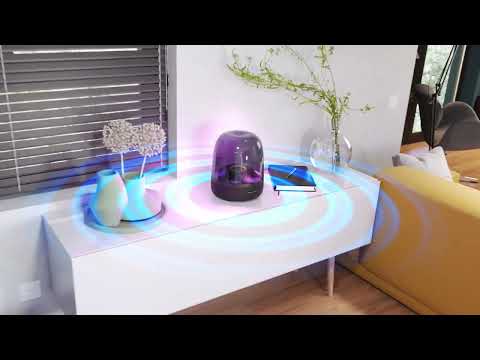
Bluetooth speaker with iconic transparent dome and themed lighting.


Superior Sound performance
Listen to music the way it was meant to be heard. Your music is reproduced with pinpoint accuracy, thanks to the speaker's distinct channels and dedicated amplifiers, reproducing every sonic detail with breathtaking clarity. Feel every beat from a 5.2" down-firing subwoofer powering deep, rich bass tones. And the wide soundstage of the 6-speaker array is the next best thing to experiencing your favorite songs live.

Unique diamond-effect lighting that dances to the music
Aura Studio 4's signature transparent dome amplifies and radiates elegant ambient illumination in all directions. Inspired by the beauty of the natural world, the shifting patterns and colors of the diamond-effect lighting bring that same sense of wonder to any space. Choose between 5 distinct animated themes to match the mood of your music—and delight your senses.

Bluetooth music streaming
Playlists are for sharing—which is why Aura Studio 4 pairs with any mobile device for seamless wireless streaming.

Made in part with recycled materials
Aura Studio 4 is made with 100% recycled fabric, 100% recycled aluminum, and 85% recycled plastic, and it's packaged using FSC-certified paper and which has been printed with soy-based inks.
Inspire your senses with enchanting lights that dance to the rhythms of beautiful Harman Kardon sound.
The iconic transparent dome of the Aura Studio 4 radiates a captivating diamond pattern that glows in all directions. Match one of its 5 distinct animated themes to the beat of your music. The lush visual atmosphere is as enticing as the speaker's powerful bass tones and clear, spacious audio.
Create memorable experiences by pairing the speaker with more than one mobile device, so everyone can share their own vibe.
General Specifications
Audio Specifications
Dimensions
Control and Connection Specifications
Spec Sheet (English)
English 920 KB- 1 x Harman Kardon Aura Studio 4
- 1 x Power cable
- 1 x Quick start guide
- 1 x Safety sheet
- 1 x Warranty card

The latest owner's manuals, quick start guides, and documents.
Aura Studio Series
\nNote: This action will erase all settings and Bluetooth data from the device. You will be required to pair and connect to your devices again after this action is done.
\n\n
Aura Studio, Aura Studio 2
\n- Turn the speaker ON
- Press and hold the Volume (+) & Phone button for more than 5 seconds
- All LED indicators will flash and the speaker will power off and be factory reset
\n
Aura Studio 3
\n- Turn the speaker ON
- Press and hold the Light Effect button for more than 10 seconds
- The speaker will power off and be factory reset
\n
Aura Studio 4
\n- Turn the speaker ON
- Press and hold the Volume (+) & Bluetooth button for more than 5 seconds
- The speaker will power off and be factory reset
\n
Aura Studio 5, Aura Studio 5 Wi-Fi
\n- Turn the speaker ON
- Press and hold the Light Mode, Vol +, & Vol - button for more than 7 seconds
- The speaker will power off and be factory reset
Or alternatively;
\n\n
- Open your Harman Kardon One App.
- Navigate to the support tile.
- Select RESTORE FACTORY SETTINGS.
Aura Studio Series
\nNote: This action will erase all settings and Bluetooth data from the device. You will be required to pair and connect to your devices again after this action is done.
\n\n
Aura Studio, Aura Studio 2
\n- Turn the speaker ON
- Press and hold the Volume (+) & Phone button for more than 5 seconds
- All LED indicators will flash and the speaker will power off and be factory reset
\n
Aura Studio 3
\n- Turn the speaker ON
- Press and hold the Light Effect button for more than 10 seconds
- The speaker will power off and be factory reset
\n
Aura Studio 4
\n- Turn the speaker ON
- Press and hold the Volume (+) & Bluetooth button for more than 5 seconds
- The speaker will power off and be factory reset
\n
Aura Studio 5, Aura Studio 5 Wi-Fi
\n- Turn the speaker ON
- Press and hold the Light Mode, Vol +, & Vol - button for more than 7 seconds
- The speaker will power off and be factory reset
Or alternatively;
\n\n
- Open your Harman Kardon One App.
- Navigate to the support tile.
- Select RESTORE FACTORY SETTINGS.
Use a clean damp cloth to gently scrub the surface.
Do not use bleach-based products or a dry cloth as it might potentially scratch the transparent dome.
","Answer__c":"Use a clean damp cloth to gently scrub the surface.
Do not use bleach-based products or a dry cloth as it might potentially scratch the transparent dome.
","ArticleType":"How_Tos__kav"}]}


