


Superior sound performance
Harman Kardon's unrivaled acoustic engineering delivers rich, room-filling sound in any setting, whether you're listening to your favorite music or making crystal clear conference calls.

Elegant design
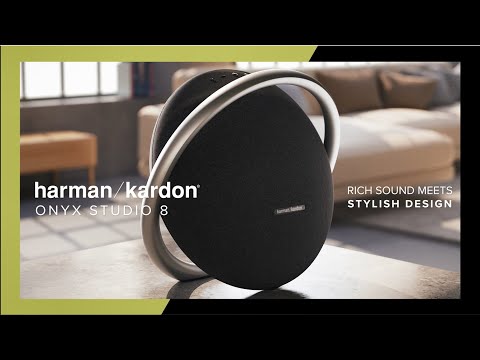
Crafted from premium materials, the Onyx Studio 8 neatly blends into your life and home. The sleek, anodized aluminum handle, which doubles as a sturdy base, means you can easily carry it from one room to another.

Self-Tuning
Enjoy perfect sounds wherever you take the music. When you power on, the Onyx Studio 8 automatically calibrates to its environment, ensuring the best sound possible no matter where you set it down.

Bluetooth streaming for up to 8 hours
The Onyx Studio 8 pairs seamlessly with any Bluetooth device for enhanced, extraordinary audio. And since music is meant to be shared, you can switch your playlists with anyone by simultaneously connecting two devices to the speaker. With 8 hours of battery time and no power cord tying you down, you can place the Onyx Studio 8 anywhere and get on with the music.

Eco-friendly materials
The Onyx Studio 8 is made with recycled plastic. The speaker grille fabric is woven from recycled polyester yarn, and our paper-based packaging is made with FSC-certified paper and printed with soy ink. Together, these choices reduce environmental impact.

Boost stereo sound with two speakers
Quickly and easily turn up the celebration with a wider, more detailed soundstage by pairing two Onyx Studio 8 speakers together, wirelessly.

Crystal clear calls
Designed with a built-in dual microphone for far-field voice clarity, the Onyx Studio 8 helps you enjoy crystal clear hands-free calls from practically anywhere in the room.
Create your own vibe with the Harman Kardon Onyx Studio 8. Both stylish and sustainable, it's crafted from recycled materials, combining eco-friendly choices and beautiful design. Use the sleek, anodized aluminum handle to carry the portable speaker anywhere. When you move the speaker from one room to the other and power on, the Onyx Studio 8 automatically calibrates itself to optimize the audio performance. You can easily use Bluetooth to pair two devices and take turns playing your favorite music. Or wirelessly pair two Onyx Studio 8 speakers together for a wider, more detailed stereo sound experience. Whether you're conferencing all day with clear, hands-free calls or unwinding to your favorite playlist, 8 hours of battery life means you'll never miss a beat.
General Specifications
Audio Specifications
Dimensions
Control and Connection Specifications
Battery
Spec Sheet (English)
English 851 KB- 1 x Onyx Studio 8
- 1 x Power cable
- 1 x Printed materials

The latest owner's manuals, quick start guides, and documents.
Onyx Series
\nNote: This action will erase all settings and Bluetooth data from the device. You will be required to pair and connect to your devices again after this action is done.
\n\n
Onyx
\n- Turn the speaker ON
- Press and hold the Bluetooth & Power button for more than 3 seconds
- The speaker will power off and be factory reset
\n
Onyx Mini, Onyx Studio 2, Onyx Studio 3, Onyx Studio 4
\n- Turn the speaker ON
- Press and hold the Volume (+) & Phone button for more than 3 seconds
- The speaker will power off and be factory reset
\n
Onyx Studio
\n- Turn the speaker ON
- Press and hold the Volume (-) & Bluetooth button for more than 3 seconds
- The speaker will power off and be factory reset
\n
Onyx Studio 5, Onyx Studio 6, Onyx Studio 7, Onyx Studio 8, Onyx Studio 9
\n- Turn the speaker ON
- Press and hold the Volume (+) & Bluetooth button for more than 5 seconds
- The speaker will power off and be factory reset
","Answer__c":"
Onyx Series
\nNote: This action will erase all settings and Bluetooth data from the device. You will be required to pair and connect to your devices again after this action is done.
\n\n
Onyx
\n- Turn the speaker ON
- Press and hold the Bluetooth & Power button for more than 3 seconds
- The speaker will power off and be factory reset
\n
Onyx Mini, Onyx Studio 2, Onyx Studio 3, Onyx Studio 4
\n- Turn the speaker ON
- Press and hold the Volume (+) & Phone button for more than 3 seconds
- The speaker will power off and be factory reset
\n
Onyx Studio
\n- Turn the speaker ON
- Press and hold the Volume (-) & Bluetooth button for more than 3 seconds
- The speaker will power off and be factory reset
\n
Onyx Studio 5, Onyx Studio 6, Onyx Studio 7, Onyx Studio 8, Onyx Studio 9
\n- Turn the speaker ON
- Press and hold the Volume (+) & Bluetooth button for more than 5 seconds
- The speaker will power off and be factory reset
","ArticleType":"How_Tos__kav"},{"attributes":{"type":"Knowledge__kav","url":"/services/data/v45.0/sobjects/Knowledge__kav/ka25d000000XjD5AAK"},"Title":"Onyx Studio 8 - Wireless Stereo Boost","Id":"ka25d000000XjD5AAK","ArticleNumber":"000037256","Question__c":"What is Wireless Stereo Boost pairing mode?","Process__c":"The Onyx Studio 8 features Wireless Stereo Boost which allows you to connect two Onyx Studio 8 speakers together for a more powerful listening experience. Please note: You cannot connect the Onyx Studio 8 to other Onyx Studio speakers such as the Onyx Studio 7, 6 and 5.","Answer__c":"The Onyx Studio 8 features Wireless Stereo Boost which allows you to connect two Onyx Studio 8 speakers together for a more powerful listening experience. Please note: You cannot connect the Onyx Studio 8 to other Onyx Studio speakers such as the Onyx Studio 7, 6 and 5.","ArticleType":"How_Tos__kav"}]}


